Flow Overview
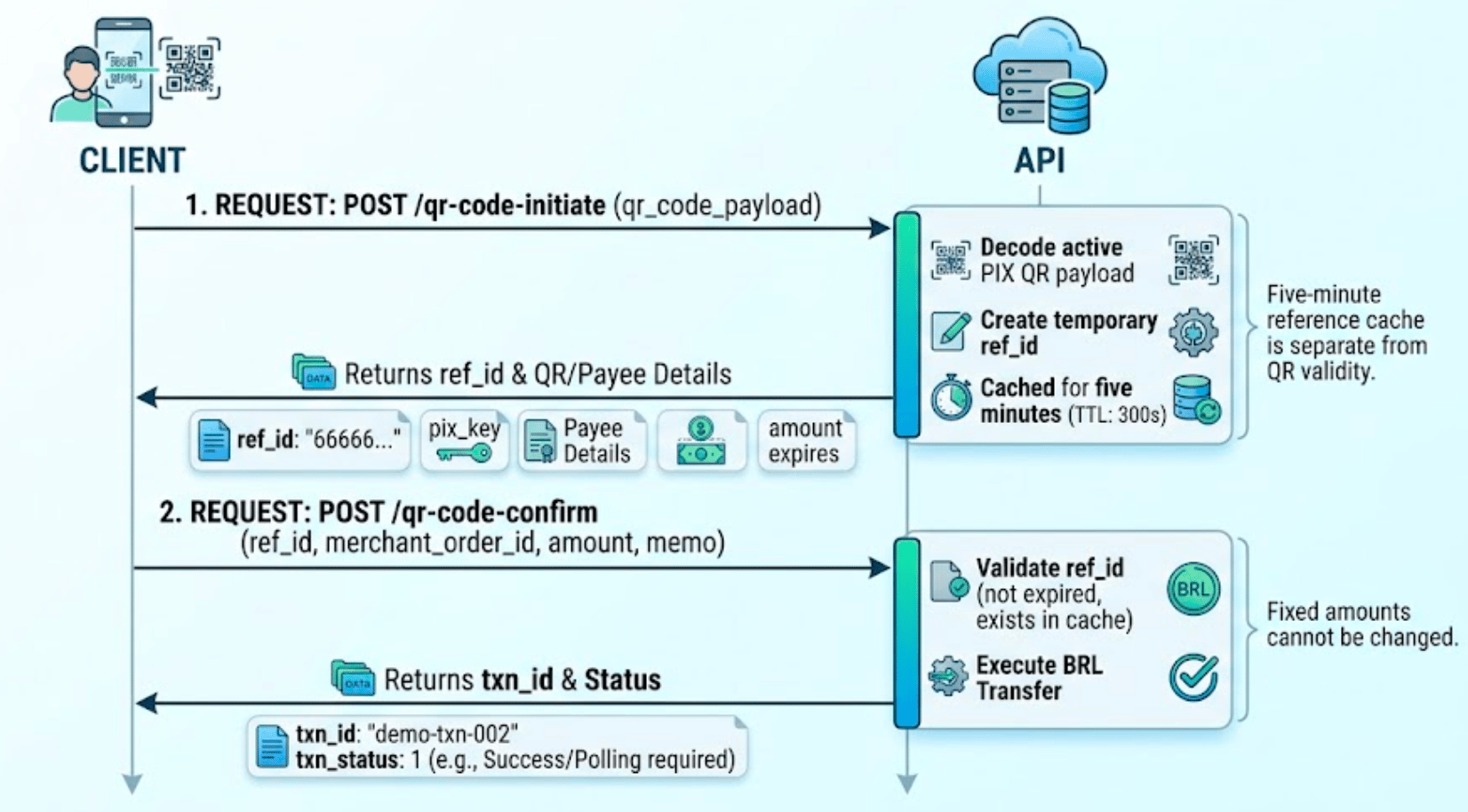
- Initiation (
qr-code-initiate): Decodes an active PIX QR code payload, validates its status, and creates a temporary reference (ref_id) valid for 5 minutes. - Confirmation (
qr-code-confirm): Consumes the generatedref_idto execute the payment in BRL.
Step 1: Initiate QR Code Decoding
POST /v3/transfers/pix/qr-code-initiate
Decodes a PIX QR payload (EMV standard / PIX Copy and Paste string) and creates a temporary reference (ref_id) bound to the initiating account.
Request Body
Success Response Data (data)
Important Note onexpires: Theexpiresresponse field contains an integer in seconds provided by the QR decoder. This is independent of the 5-minute cache TTL ofref_id. Do not strictly rely onexpires: 300as a guarantee of local validity; confirm the QR payload’s actual deadline when rendering client-side UI countdowns.
Example — Initiation
Request: BashStep 2: Confirm Transfer
POST /v3/transfers/pix/qr-code-confirm
Executes payment processing using the valid reference created by the QR initiation endpoint.
Request Body
Success Response Data (data)
Note: The synchronous response from the confirmation endpoint may carry a non-final status (txn_status). If needed, poll the status endpoint using a fresh nonce.
Example — Confirmation
Request: BashAuthentication and Headers
All requests require HMAC-SHA256 authentication. Header requirements depend on the credential type being used:Credential Notes:
- ACCOUNT: Credentials bound directly to a single account. Omit
X-ISPBandX-Account-Number.- USER: Requires both
X-ISPBandX-Account-Numberpresent in headers and included in the canonical header set prior to calculatingX-Signature.- PLATFORM: Not accepted on these endpoints.
Error Matrix
Endpoint-specific error codes for the PIX QR code transfer flow, in addition to standard signature and timestamp verification errors:Business Rules & Best Practices
- Reference Lifetime (
ref_id): Theref_idfor QR transfers carries a cache time-to-live (TTL) of 5 minutes (300 seconds), compared to 60 seconds for key transfers. - Fixed vs. Variable Amount QR Codes:
- Fixed-Amount QR: The
amountsubmitted in/qr-code-confirmmust match theamountreturned in/qr-code-initiate. Any modification will trigger an HTTP400error. - Variable/Open QR: If no amount is embedded in the initial QR payload, the client must specify the transfer amount during the
/qr-code-confirmrequest.
- Fixed-Amount QR: The
- Single-Use Reference: The
ref_idis automatically invalidated and deleted upon successful payment confirmation. If an upstream network error occurs during confirmation, the reference is retained within its 5-minute window for retry attempts. merchant_order_idFormat: Order identifiers must begin with a UTC date prefix formatted asYYMMDD(e.g.,261101-qr-order-001). Requests are rejected if the date string drifts beyond UTC ±1 hour.